Every bundle agent builds a visual relationship map of the data it collects. Entities, connections, and patterns rendered as an explorable graph. No extra cost.
A knowledge graph is a map of everything that's connected to everything else — and HOW they're connected. Unlike tables and spreadsheets, a knowledge graph stores data as entities and relationships, revealing patterns that flat data hides.
Entities in the graph. A person, a company, a skill, a document, an event. Each node holds properties — name, score, date, duration.
Relationships between nodes. WORKED_AT, HAS_SKILL, SCORED, CONNECTED_TO. Each edge carries its own properties — role, proficiency level, start date.
Data attached to nodes and edges. A Person node has name, email, score. A WORKED_AT edge has start_date, end_date, role_title.
Sequences showing how entities connect indirectly. How is Candidate A connected to Company B? The path reveals relationships invisible in flat data.
Why it matters: Patterns that are invisible in spreadsheets become obvious in graphs. "These 3 candidates all worked at the same company." "This patient has been prescribed conflicting medications by two different doctors." "This insurance claim connects to 4 other claims through the same repair shop."
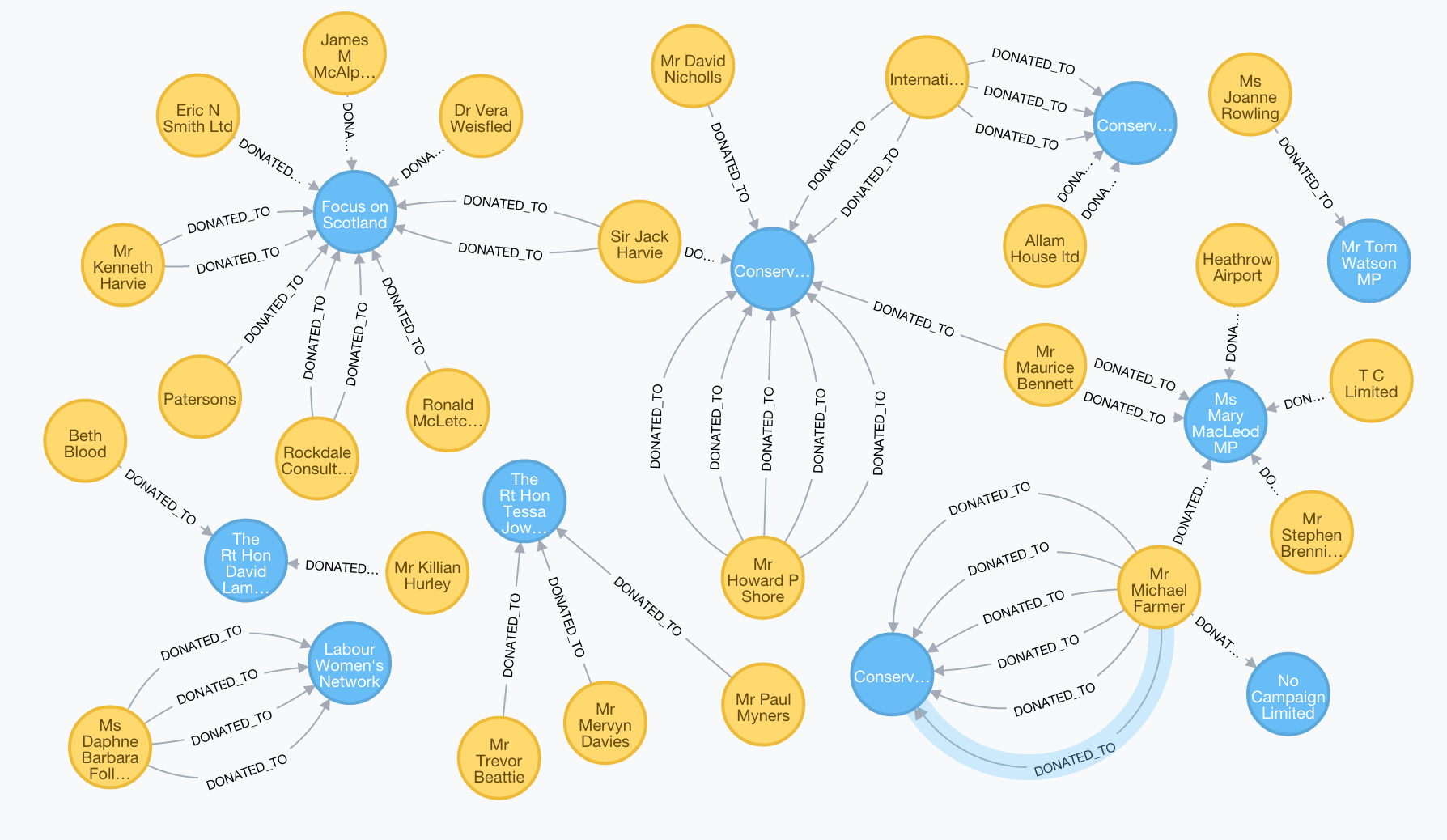
A real knowledge graph mapping donor relationships. Yellow nodes are people. Blue nodes are organisations. Every DONATED_TO edge shows who gave to whom. Patterns that would take hours to find in a spreadsheet are visible at a glance — shared donors, overlapping recipients, and indirect connections between entities that never appear in the same row.
Neo4j is the world's leading graph database. It stores nodes and relationships natively — not as tables that simulate relationships through joins. This means relationship queries run in a single traversal, not multiple table joins.
Finding "all people connected to Company X who also have Skill Y" is a single traversal, not multiple table joins across separate databases.
Fraud rings, talent clusters, referral paths, and hidden connections that SQL databases can't surface without complex queries appear automatically.
Neo4j's Infinigraph architecture handles 100+ terabytes and billions of nodes. Our instance runs as a container integrated with every bundle agent.
Every API response includes two distinct graph representations. The workflow path shows what the agent did. The relationship graph shows what the agent found. Together they tell the complete story.
Knowledge graphs deliver value in four distinct ways. Every tool in every bundle maps to at least one of these perspectives.
Graphiti (temporal knowledge graph engine) is already integrated into our stack. It processes incoming text, extracts entities and relationships, and stores them in Neo4j as conversations happen.
Every tool writes an episode to Graphiti with a contextual summary. Graphiti's LLM extracts entities and classifies them into 6 types: Candidate, Skill, Company, Role, Assessment, Document. Entities from each tool are returned separately — not mixed into one pool.
Edges are classified into 8 types: HasSkill, WorkedAt, ScoredOn, AppliedFor, Requires, ProducedDocument, EvaluatedBy, and RelatedTo. Each type has a distinct color in the graph. Relationship types are defined with structured Pydantic models that guide the LLM's extraction.
Every fact has a timestamp. The engine knows WHEN something was true, not just THAT it was true. Old facts are invalidated by new evidence automatically.
The same 6 entity types serve all 13 bundles through broadened definitions. A "Candidate" is also a patient, traveler, claimant, tenant, or student. A "Role" is also a programme, policy type, or booking. Graphiti's LLM classifies entities correctly regardless of industry.
Relationship graphs render as interactive SVG using D3.js v7 with force simulation, drag interaction, hover tooltips, edge-colored arrows, and print-to-PDF. Each tool's graph renders in its own panel with a step header and entity legend.
When multiple tools run in one turn, a gold step chain renders above the relationship graphs. Step 1 → Step 2 → Step 3. Each step shows the tool name (humanized from the internal name), step number, and entity count. The path tells the story at a glance.
When a client runs a hiring workflow that calls multiple tools, the API returns a knowledge_graphs array. Each entry is one tool's graph. The frontend renders two things:
Each panel is clean and focused on ONE tool's output. The workflow path tells the story at a glance. The panels show the details. Edge colors distinguish skill relationships (green) from assessment scores (coral) from document production (purple). Entity nodes are colored by type: Candidate (blue), Skill (green), Company (gray), Role (gold), Assessment (coral), Document (purple).
HR/Hiring is the primary working example. The entire hiring funnel becomes a connected visual story — every step is a node with drill-down capability.
The hiring manager sees the entire funnel as a connected visual story. Click any step to drill down. Click any candidate to see their complete journey. Click any assessment to see the dimensional breakdown. The graph is the record.
All 56 tools write to the knowledge graph. The 25 HR/Hiring tools below are the primary reference. An additional 23 multi-industry tools (intake, document generation, travel, insurance, education) and 6 API tools (lead capture, pricing, SMS, email triage, web search, contact forms) also write per-tool graph data with every call.
Type R: Candidate Profile Node at center. Edges branch to skills matched (green), skills missing (red), experience nodes (each company, duration, role), education nodes. The employer sees WHY the score is 72 — a visual map of what matched and what didn't. Click any skill to see where in the CV it was identified.
Type I: During a live screening conversation, Neo4j captures entities in real time — company names, role titles, durations, technologies. The graph grows with every answer.
Type R: Every candidate becomes a node. Edges between candidates show shared attributes — same school, same former employer, overlapping skills. Visual clusters appear: "These 4 candidates all have React + Node.js and worked at startups." Across multiple batch screens, the graph accumulates. Cross-position candidate matching becomes possible.
Type R: Comparison graph with weighted edges to shared competencies. Where candidates overlap, edges are thick. Unique strengths appear as standalone branches. A Role Requirements node at top shows how close each candidate connects to it.
Type I: During a live discussion, Maya pulls up the graph. The manager says "What about leadership?" — Maya highlights that dimension, the graph rearranges to emphasize leadership-related nodes.
Type R: Filtered subgraph of the full batch graph. Only candidates above threshold remain visible, but edges between them (shared companies, schools, skills) stay. The employer sees not just who made the cut, but how the top candidates relate to each other.
Type R: Gap map overlay. The ideal role profile is the template graph. The candidate's actual profile overlays on top. Missing nodes appear as red empty circles. Weak nodes are orange. Strong nodes are green. A visual completeness fingerprint.
Type I: During a live conversation, Maya probes gaps: "I notice a 2-year gap between Company A and Company B." As the candidate explains, Neo4j fills in the gap node with new information. The graph visually completes as answers arrive.
Type R: Behavioral dimension graph — candidate at center, branches to each dimension (Empathy, Task Focus, Service Behavior, Stress Response). Each dimension node has a score and connects to the specific scenarios that revealed that score.
Type I: During a live behavioral assessment, Maya asks scenario questions. Neo4j extracts entities in real time: situation, action taken, result, emotions involved. STAR format becomes a visual graph. Each question produces a mini-graph. By the end, the candidate's behavioral profile is a rich, interconnected story.
Type R: Skills radar in graph form. 7 nodes for each section, each with scores. Edges between related skills show correlation: "High grammar AND high email writing — consistent" or "High typing speed but low grammar — speed without quality." Over time, skill correlation insights emerge from graph analysis across many assessments.
Type R: Language node connects to sub-dimensions: vocabulary, grammar, reading, writing, speaking comprehension. Each with scores. Cross-reference with other assessments: "This candidate speaks Thai at intermediate level AND scored high on customer service behavioral assessment — good fit for Thai-speaking client-facing role."
Type R: Maps the candidate's answers to knowledge domains. References to regulations, case law, medical procedures, or technical standards become nodes. Dense clusters indicate deep expertise. Sparse areas indicate surface knowledge.
Type I: During a live knowledge assessment, Maya asks domain questions and Neo4j maps answers to knowledge domains in real time. Visual knowledge mapping — the interviewer sees expertise areas growing or staying empty as questions progress.
Type R: Custom assessment graph adapts to whatever subject is being tested. Structure mirrors the employer's rubric — each grading dimension becomes a graph branch. Cross-assessment relationships connect behavioral, skills, and custom assessments into a complete competency picture.
Type R: Delivery and engagement tracking graph. Brief Sent → Opened → Read Duration → Assessment Started. Across candidates: "Average time between brief read and assessment start is 2 hours. Candidates who start within 30 minutes score 15% higher."
Type R: The score as a node connected to: the threshold it exceeded, specific strengths that pushed it above threshold, comparative position against other candidates. Graph context for the number — the score stops being abstract and becomes connected to real evidence.
Type R: Question-to-competency graph. Each generated question is a node connected to the competency it tests. Competencies connect to role requirements. The interviewer sees which questions test multiple competencies and which test only one.
Type I (key vision): Maya conducts the interview via avatar. Each question becomes a node. Each answer creates response nodes. Entities extracted from answers (companies, projects, skills, timelines) become connected nodes. The interview IS the graph. The graph IS the interview record. When it's done, the employer has a visual map of the entire conversation — not a transcript to read, but a relationship map to explore.
Type R: Competency-to-question mapping with expected STAR elements. The interviewer sees which competencies are covered and which need more questions.
Type I: During a live behavioral interview, the candidate's response is decomposed into Situation → Task → Action → Result nodes in real time. If the candidate skips "Result" — the graph has a gap. Maya follows up automatically: "And what was the outcome?"
Type R: Candidate node connects to platform nodes (LinkedIn, Facebook, TikTok, Instagram). Each platform connects to content nodes (posts, groups, connections). Content connects to entity nodes (companies followed, people connected with, interests expressed). Cross-reference the candidate's social graph with the company's graph — relationship insights no spreadsheet can deliver. Red flags become high-visibility nodes with warning edges.
Type I: During a live conversation where Maya discusses social findings: "I noticed you're connected to 3 people at our company." The graph renders live, showing connections. As the candidate explains each relationship, edges get labeled: "former colleague," "university classmate."
Type R: 6-dimension scores transformed into a graph overlaid on the candidate's broader profile. Each dimension (professionalism, consistency, activity level, network quality, content sentiment, red flags) connects to specific evidence from the scan. Not just "Professionalism: 7/10" but the score grounded in visible evidence nodes.
Type R: Consent tracking graph. Candidate → Consent Request (date sent, platforms requested) → Consent Response (date received, platforms approved/denied). Over time: "80% consent to LinkedIn scan, only 40% consent to Facebook." Compliance audit trail — every scan has a visible consent chain in the graph.
Type R: Role relationship graph. Role → Department → Reports To → Works With → Requires (skills, certifications) → Offers (salary, benefits). Connects to the company's organizational graph. Across multiple JDs, the graph reveals skill dependencies and role overlaps.
Type R: Distribution and conversion graph. Ad → posted on LinkedIn, Indeed, company website → applications received from each → conversion rates. Which channels produced the best candidates? Graph shows recruitment marketing effectiveness.
Type R: Candidate journey graph: Application → Screen → Assessment → Interview → Offer → Accepted/Declined. If the candidate declined, the graph shows where the journey ended. Across all offers: "We sent 10 offers this month. 7 accepted. The 3 who declined all scored above 85 — we're losing top talent at the offer stage."
Type R: Verification graph. Each claim becomes a node, each reference response becomes a verification edge. Green = confirmed, red = contradicted, gray = unverifiable. At a glance: "7 of 9 claims confirmed. 1 contradicted (team size was 6, not 12). 1 unverifiable." A visual trust map of the candidate's claims.
Type R: 90-day journey graph: Hire Date → Week 1 objectives → Week 4 check-in → Week 8 mid-review → Day 90 final assessment. Each objective is a node with completion status. Green = completed, red = missed, orange = in progress. Across multiple reviews: "New hires consistently struggle with Objective 4. Improve the onboarding for that area."
Type R: Tracking graph: Invite Sent → Opened → Video Recorded → Submitted → Scored. Completion funnel as a graph. "We sent 50 invites. 35 opened. 20 recorded. 18 submitted." Which candidates dropped out at which stage?
Type R: Knowledge retrieval path: Query → Document Sources → Relevant Passages → Answer. Full transparency into which documents Maya pulled from and how the answer was constructed.
Type I: During a live conversation, when a candidate asks a question, Maya searches the knowledge base and the graph renders live: the employer sees exactly what Maya pulled from and how she constructed the answer. Trust through transparency.
Type R: Schedule and outcome graph: Candidate → Interview Scheduled → confirmed/rescheduled/no-show → Interview Completed → Outcome. Pattern: "15% no-show rate. No-shows are 3x more likely for morning slots."
The avatar interview with a real-time knowledge graph is the single most powerful use of this technology. Maya conducts the interview on one side of the screen. The knowledge graph grows on the other. Here is how it works, step by step.
The graph informs the conversation. The conversation builds the graph. They feed each other. Maya doesn't just ask questions — Maya connects answers to what's already known. "You mentioned Company X — I see we screened another candidate from Company X last month. They described the culture as collaborative. Does that match your experience?"
Every interaction builds the graph. Every screening, every assessment, every interview, every offer. Over months, the graph becomes a talent intelligence system — a living map of the company's relationship with the talent market.
Most platforms return flat reports — scores, text summaries, ranked lists. Knowledge graphs transform output into connected intelligence.
This is what separates a screening tool from a screening intelligence platform.
All 56 tools write to the knowledge graph. Each industry bundle draws from 25 bundle-specific tools plus 31 shared multi-industry tools. Every tool call produces a relationship graph. Multi-tool workflows produce a workflow path showing the complete sequence.
Try the HR pipeline now. Score a CV free in 30 seconds. No account required. Or request a business license to run the full pipeline with knowledge graph output.
Knowledge graphs transform AI screening output from flat reports into connected visual intelligence. All 56 tools on this platform write to a Neo4j knowledge graph via the Graphiti temporal knowledge graph engine. Entities are classified into 6 types: Candidate (also patients, travelers, claimants, tenants, students), Skill, Company (also schools, hospitals, agencies), Role (also programmes, policies, bookings), Assessment (also compliance checks, eligibility checks, damage assessments), and Document (also contracts, invoices, itineraries, FNOL reports). Relationships are classified into 8 edge types: HasSkill, WorkedAt, ScoredOn, AppliedFor, Requires, ProducedDocument, EvaluatedBy, and RelatedTo. Two representations serve different purposes. The Workflow Path shows the sequential chain of tools that ran in a turn as gold step nodes connected by arrows. The Relationship Graph shows the entity network extracted by each tool as a D3.js force-directed interactive SVG with nodes colored by entity type and edges colored by relationship type. When multiple tools run in one turn, the API returns a knowledge_graphs array with per-tool graph data including step number and tool name. The frontend renders the workflow path at top and each tool's relationship graph in separate panels below. The HR/Hiring bundle demonstrates all 25 bundle-specific tools plus 31 shared multi-industry tools, mapped to four user perspectives: get value, create opportunities, use information, and avatar presentation. Knowledge graphs are included free with every bundle across all 10 industries. Available in 30 languages with pay-as-you-go pricing.